Send one link. Clients review it. Approved.

Clients click a link, review the right version, and approve — no accounts, no logins, no "is this the latest?"

14-day free trial — no credit card required

Writerflow document viewer with multi-stage approval workflow
The Problem

Your team spends more time chasing approvals
than creating work.

Email threads. Slack messages. Google Doc comments. The tools weren't built for approval workflows — and it's costing you more than you think.

AI made content faster. It didn't make approvals faster.

Your team produces 3x more content now. Every piece still waits in the same email thread for the same overloaded reviewer.

Half your week is approval detective work

Account managers spend 8-12 hours a week chasing sign-offs instead of serving clients. The bottleneck isn't production — it's the queue between 'done' and 'approved.'

Approval chaos is your most expensive employee

Every new client adds coordination overhead without adding revenue. You're hiring project managers to chase emails, not produce work.

You don't need more project managers. You need approval infrastructure.

You draft in Google Docs. You sign in DocuSign. You approve in Writerflow.

Structured approval workflows built for agencies managing client content across multiple accounts.

Built for Complex Reviews

Multi-Stage Approval
Orchestration

Define approval stages. Reviewers are notified in order. Stage 2 doesn't start until Stage 1 approves. Full visibility at every step. No more CC'ing 5 people and hoping they respond in order.

Writerflow workflow editor showing a three-stage blog review with conditional branching

Define stages

Set up as many approval stages as your workflow needs

Sequential notifications

Reviewers notified only when it's their turn

Stage gating

Stage 2 blocked until Stage 1 fully approves

Full visibility

See exactly where every document stands at every step

Content Planning

Approval starts before
a single word is written.

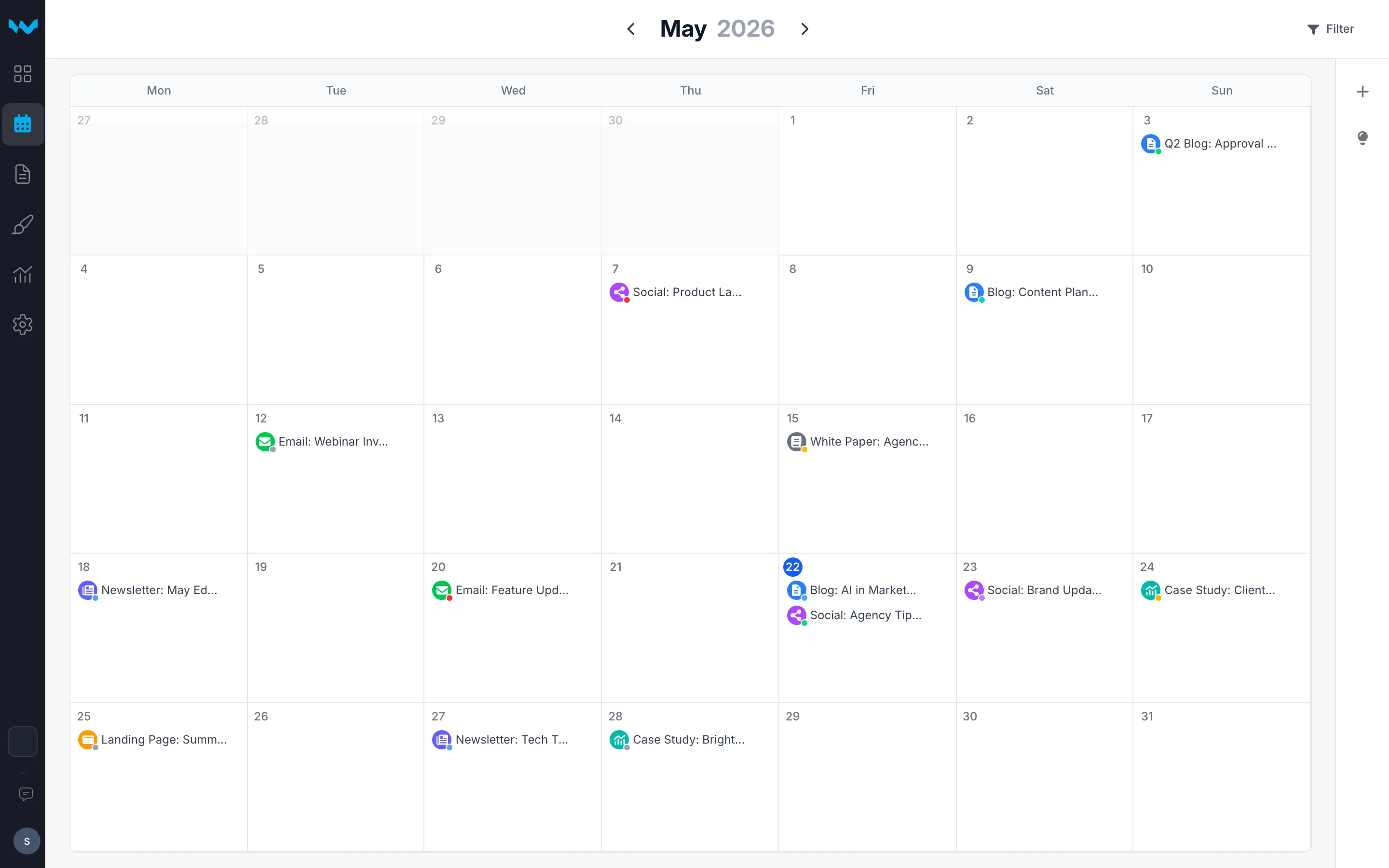
Writerflow's content calendar connects planning to approval. Schedule content, create detailed briefs, assign writers — and every piece flows into multi-stage review automatically.

Visual content calendar

See every client's content on one calendar. Drag and drop to schedule. Filter by status, type, or writer.

Structured briefs

Define audience, tone, keywords, and format requirements in a structured brief. Writers get clarity before they start.

Full mobile experience

Review the calendar, read briefs, and approve content from your phone. Two taps to approve. No laptop required.

Writerflow content calendar with ideas backlog
How It Works

From idea to approved in five steps

Step 1: Plan

Schedule content across every client

Use the visual content calendar to plan what’s publishing, when, and for which client. Drag and drop to reschedule. Capture ideas before they disappear.

Visual month calendar

See every client’s content on one calendar, color-coded by status

Ideas backlog

Capture ideas, then drag them onto the calendar when ready

Filter by client, type, or status

Focus on what matters — blog posts, social, newsletters, any content type

Step 2: Brief & Assign

Brief writers so the first draft hits the mark

Create structured briefs with audience, tone, keywords, and format requirements. Assign a writer and deadline — they get notified with everything they need.

Structured briefs

Audience, tone, keywords, word count, format — everything a writer needs

Assign a writer

Writer gets notified with the complete brief and deadline

Flows into approval

When the draft is submitted, it enters the approval workflow automatically

Step 3: Review

The right people review in the right order

Set up multi-stage approval workflows. Internal review first, then client sign-off. Magic links let clients review without creating accounts.

Multi-stage workflows

Stage 2 doesn’t start until Stage 1 approves

Magic links for clients

Clients review without accounts — one click from their email

Track review status

See who’s reviewed, who’s pending, and when

Step 4: Feedback

Feedback attached to specific text

Reviewers comment directly on specific text. Every note is attached to exactly what needs attention — no more vague email feedback.

Inline comments

Highlight text and add feedback — no ambiguity about what needs to change

Threaded discussions

Respond to comments, resolve threads — all in context

Upload revisions

New version created automatically — previous versions preserved

Step 5: Approved

Content approved. Every decision on record.

The approved version is locked with a complete audit trail. Who approved what, when, and in which stage — permanently recorded.

Version locked on approval

The approved version is frozen — download exactly what was signed off

Complete audit trail

Every change, comment, and approval logged permanently

CMS & platform integrations

Coming Soon

Push approved content directly to your CMS or publishing platform

Built for agencies like yours. Try it free.

Start Free Trial

14-day free trial — no credit card required

Trust & Control

Every approval.
Permanently on record.

When a client says "I never approved that," you have the proof. Timestamped, locked, and downloadable.

Audit Trails

Every review, approval, and change logged with timestamps. Know who did what, when, and why.

Version History

Complete revision history. Roll back to any version. Compare changes side-by-side.

Approval Records

Who approved what, in which stage, on which date. Locked permanently. Dispute resolved.

Data Ownership

Your content is yours. Export everything. Delete your workspace anytime. No lock-in.

Security

Encryption at rest and in transit, role-based access control, and time-limited magic links for clients and stakeholders.

Email Notifications

Reviewers are notified when it's their turn. Automatic reminders if they haven't responded. No more chasing.

FAQ

Frequently asked questions

Everything you need to know about Writerflow

Writerflow is a document approval workflow platform. Upload documents → Request reviews → Add inline comments → Track approvals. It eliminates email/Slack chaos with structured review workflows. Magic links let clients and stakeholders comment without creating accounts. We're launching with human collaboration features, and AI Review Agent is coming soon.

Magic links let you share documents with clients and stakeholders without requiring them to create accounts. They can view, comment, and approve/request changes—zero friction. Links expire after 7 days by default and can be revoked anytime. Perfect for client approvals and external stakeholder reviews.

Yes — 14-day free trial on any plan. No credit card required, no hidden fees. You get full access to your selected plan's features during the trial.

Google Docs has inline comments but no approval workflow. You don't know who's reviewed, who's approved, or what the approval status is. Writerflow adds structured approval tracking: request specific reviewers, track who's responded, see approval states, maintain permanent approval records. It's approval workflow infrastructure, not just commenting.

Yes — upgrade or downgrade anytime. If you upgrade, you get access to the new plan's features immediately. If you downgrade, the change takes effect at your next billing cycle.

Those tools focus on visual proofing for design files. Writerflow is approval orchestration for document content — multi-stage workflows where Stage 1 reviewers approve before Stage 2 even starts, magic link access so clients never need an account, and full audit trails for compliance.

Ready to fix your approval workflow?

Stop chasing approvals over email. Start your free trial and see the difference in your first review.

Start Free Trial

14-day free trial — no credit card required